PDKs
A PDK (process design kit) is what Undine knows about a fabrication process: its layers and design rules, the DRC and LVS decks, the SPICE models, the device symbols and the PCell generators. PDKs live only on the server; the browser gets the layer names and colours and the generated geometry, never the models or the rule decks.
Undine does not ship a PDK. You install PDKs with ciel, the open-source PDK version manager, and each project is pinned to one exact version of one PDK. This page explains which PDKs Undine supports, how to install them, how a project records its PDK, and how to move a project to another version.
Supported PDKs
| PDK | Variants | Version Undine is tested with | What works |
|---|---|---|---|
| SkyWater SKY130 | sky130A, sky130B |
open_pdks 8afc8346a57fe1ab7934ba5a6056ea8b43078e71 (2025); installed by ./setup.sh |
KLayout DRC and LVS, Magic DRC, Magic + Netgen LVS, ngspice at the corners tt, ss, ff, sf, fs, the PDK's PCells, the Tiny Tapeout and Caravel tapeout targets |
| GlobalFoundries GF180MCU | gf180mcuA (3 metals), gf180mcuB (4), gf180mcuC, gf180mcuD (5) |
open_pdks 792ef67037d74c8c51811eab3ce23cf793491296, the version wafer.space pins |
KLayout DRC and LVS, Magic DRC, Magic + Netgen LVS, ngspice at typical, ss, ff, sf, fs, 29 PCells (nfet, pfet, resistors, MIM and MOS capacitors, diodes, BJTs, vias), the wafer.space tapeout target |
| IHP SG13G2 | ihp-sg13g2 |
IHP-Open-PDK 89d42ee6d2fd9b50b86a1aada6fee6673c3e6008 |
KLayout DRC and LVS, Magic DRC, Magic + Netgen LVS, ngspice at mos_tt, mos_ss, mos_ff, mos_sf, mos_fs once its Verilog-A models are compiled, 38 PCells (nmos, pmos, resistors, MIM capacitor, ...) |
| IHP SG13CMOS5L | ihp-sg13cmos5l |
not tested (installed by ciel with the ihp-sg13 family) |
Unverified. KLayout DRC and Magic DRC. Magic + Netgen LVS and ngspice (mos_* corners, once the models are compiled) are set up as for SG13G2 but have not been run. No KLayout LVS (Undine sets none up for it yet), no PCells, and the PDK ships no standard-cell library |
The PCell panel of the layout editor places each PDK's own PCells, and
schematic-driven layout generates MOSFETs, resistors and MIM capacitors from a
schematic on SKY130, GF180MCU and SG13G2. Mind the width parameter: GF180MCU's w_gate is per finger, SG13G2's w is
the total over the ng gates.
Other versions of these PDKs usually work as well, but they have not been tested. SKY130 from open_pdks before 2025 is the exception: Undine no longer runs its PCell code (see Versions no longer supported).
A PDK of another family is still found and listed, but Undine has no profile for it: it knows none of its layers, decks or models, and the features that need them are unavailable.
Installing a PDK
SKY130
./setup.sh installs SKY130 at the tested version as its pdk step. To run that step alone:
./setup.sh pdk
It runs ciel enable --pdk-family sky130 with the version Undine is tested with, which its built-in
profile lists (pixi run python -m undine pdk tested sky130 prints it:
8afc8346a57fe1ab7934ba5a6056ea8b43078e71). That downloads the PDK into $PDK_ROOT (by default ~/.ciel) and
enables it. The step is skipped when that version is already installed, and
./setup.sh runs its check afterwards.
For another version, give the open_pdks commit in PDK_VERSION:
pixi run ciel ls-remote --pdk-family sky130      # the versions ciel can install
PDK_VERSION=<open_pdks commit> ./setup.sh pdk
pixi run pdk
pixi run pdk (python -m undine pdk enable sky130) is a plain ciel enable of the tested SKY130 version. It
does not read PDK_VERSION or PDK_FAMILY, does not skip an installed version, and runs no check afterwards.
Use ./setup.sh pdk for anything else.
GF180MCU and IHP SG13G2
Install them at the tested versions with ciel (./setup.sh pdk and pdk enable take the version from the family's
built-in profile when none is given):
PDK_FAMILY=gf180mcu ./setup.sh pdk
PDK_FAMILY=ihp-sg13 ./setup.sh pdk
pixi run python -m undine pdk enable gf180mcu
pixi run python -m undine pdk enable ihp-sg13
pixi run ciel enable --pdk-family gf180mcu 792ef67037d74c8c51811eab3ce23cf793491296
pixi run ciel enable --pdk-family ihp-sg13 89d42ee6d2fd9b50b86a1aada6fee6673c3e6008
The ihp-sg13 family installs both SG13G2 and SG13CMOS5L. Then:
- for IHP, compile the transistor models once:
./setup.sh osdi(below); - for GF180MCU, the PCells run in their own environment,
pcell-gf180(gdsfactory 7.9), which theinstallstep of./setup.shcreates (pixi install -e pcell-gf180).
Rescan after installing a PDK
The server looks for PDKs when it starts. A PDK installed while it runs appears after a rescan, with no restart:
Rescan PDKs in the PDK badge's menu, or POST /api/pdks/rescan. A PDK fetched from the browser
(Fetching a project's PDK) is found at once. A restart (./scripts/restart.sh)
finds it too, and loses no work (Restarting the server).
Without pixi, install ciel with the server (pip install -e "server[pdk,dev]") and run the same ciel enable
commands; see Install without pixi.
Where Undine looks for PDKs
At start, Undine searches these PDK roots, in this order:
$PDK_ROOT, when it is set (ciel also installs there);~/.ciel;~/.volare(PDKs installed with volare, ciel's predecessor).
--pdk-root DIR replaces that list. It is a global option, so it comes before the command, and you can repeat it:
pixi run python -m undine --pdk-root /opt/pdks --pdk-root ~/.ciel serve
--pdk-root and the setup steps
Only the commands of python -m undine take --pdk-root. The osdi step and the already-installed check of the
pdk step always search the default roots. For a PDK under another root, set PDK_ROOT to that root when you run
them, for example PDK_ROOT=/opt/pdks ./setup.sh osdi.
In each root, Undine finds:
- every version in ciel's store,
<root>/ciel/<family>/versions/<commit>/<variant>/, and in volare's,<root>/volare/<family>/versions/<commit>/<variant>/: all installed versions, not only the enabled one; - a plain PDK directory,
<root>/<variant>/libs.tech/. When it is a link into aversions/<commit>/directory (the version ciel or volare enabled), its version is that commit; otherwise it has no version.
A PDK is known by its id: the variant, @, and the first 12 characters of the commit, such as
sky130A@8afc8346a57f. A PDK without a version has its bare name as id. When two roots hold the same id, the first one
found is used. To list what Undine found:
pixi run python -m undine pdk list # or: pdks
With the three families above installed, the output starts like this (shortened):
gf180mcuA@792ef67037d7           lyp=yes xschem=yes  792ef67037d74c8c51811eab3ce23cf793491296  ciel    /home/you/.ciel/ciel/gf180mcu/versions/792ef67.../gf180mcuA  libraries=gf180mcu_fd_pr,...
...
ihp-sg13g2@89d42ee6d2fd          lyp=yes xschem=yes  89d42ee6d2fd9b50b86a1aada6fee6673c3e6008  ciel    /home/you/.ciel/ciel/ihp-sg13/versions/89d42ee.../ihp-sg13g2  libraries=sg13g2_pr,sg13g2_stdcell,...
sky130A@8afc8346a57f             lyp=yes xschem=yes  8afc8346a57fe1ab7934ba5a6056ea8b43078e71  ciel    /home/you/.ciel/ciel/sky130/versions/8afc834.../sky130A  libraries=sky130_fd_pr,sky130_fd_sc_hd,...
lyp says whether the PDK has KLayout layer properties (the layer colours), xschem whether it has Xschem device
symbols. Then come the full commit, the installer (ciel, volare, or - for a plain directory), the directory and
the libraries installed (libs.ref/).
How a project pins its PDK
A new project is pinned to one exact PDK version:
+ Project in the top bar opens New project, which asks for a name and for PDK, pinned to this exact version: one of the ids the server found, or none.
pixi run python -m undine new demo --pdk sky130A
You can give a full id or a bare name. A bare name such as sky130A picks a version: a version whose PCells Undine
runs before one whose PCells it does not, the tested version before the others, then the first found. The project
records the exact id it picked.
project.json names the PDK by its id:
{
  "name": "demo",
  "pdk": "sky130A@8afc8346a57f",
  "libraries": {"mylib": "libs/mylib"}
}
The project's undine.lock records the same id, next to the tool versions, so that a
checkout on another machine can tell when it has another PDK version. A lock of format 2 pins more: the PDK's files
(Pinning the PDK by its files). A project made by hand with a bare name in
project.json ("pdk": "sky130A") still opens, but the version is picked from the name each time
it opens; pin the id instead, so that every machine uses the same version.
The PDK badge at the top of the window shows the project's PDK:
| Badge | Meaning |
|---|---|
| sky130A @8afc834 | the PDK the project is pinned to is installed here; hover for the full id. With a format 2 lock, the badge also says how the PDK stands against the pin, such as unverified (trust on first use) or modified (PDK states) |
| sky130A @bdc9412 no longer supported | installed, but Undine no longer runs its PCell code: click it to move the project |
| PDK sky130A@8afc8346a57f is not on this server | the project names a PDK this server did not find: fetch it (Fetch... in the badge's menu, below), or install it and rescan, or move the project to one that is installed |
| No PDK | the project has no PDK |
Click the badge for its menu: the PDK's state against undine.lock with a line on what it means, Fetch... when
the PDK is missing or modified, Rescan PDKs, and, for a version no longer supported, the move.
A project whose PDK is missing still opens, without a PDK: the layout and schematic files are there, but the models, decks, symbols and PCells of the PDK are not.
Pinning the PDK by its files
A format 1 lock pins the PDK by its id, which names a commit but says nothing about the files on this machine: a PDK edited after it was installed, or one installed from another source under the same commit, looks the same. Pin the PDK by its files with:
pixi run python -m undine pdk verify demo --pin
undine.lock: the PDK pinned as installed here (format 2)
PDK unverified
This hashes the installed PDK and writes undine.lock as format 2 (undine.lock): the full
commit, where it came from (ciel and its source), the libraries installed and one hash per part (libs.tech, each
libs.ref/<lib>, and IHP's other libs.* directories). So a PDK installed with more libraries still matches, and a
change is reported for the part it is in. What gets written into a PDK after install does not count:
__pycache__/ and *.pyc (from importing the PCell code; Undine's own PCell runs write none) and
libs.tech/ngspice/osdi/ (models an older setup compiled there). A 12-character id is expanded to the full commit
from the PDKs installed here; for one that is not installed, add --network to let ciel look it up (ciel
ls-remote).
Hashing a SKY130 variant (about 1 GB) takes seconds the first time. Undine keeps the hashes with the files' stamps in
its store (pdk/), and later only reads a file whose stamp changed. lib status and
the badge read only those kept hashes, never the PDK.
After that, pdk verify demo (without --pin) compares the PDK with the pin and never writes the lock:
  libs.tech: modified ngspice/sky130.lib.spice
~ the PDK files differ from the pin: reinstall it (`ciel rm --pdk-family sky130 8afc8346a57fe1ab7934ba5a6056ea8b43078e71`, then pdk fetch), or pin it as it is now with pdk verify --pin
PDK modified
pdk verify --pin on a lock that is format 2 already pins the PDK again as it is now, and says what the old pin was.
lib lock --format 2 also writes format 2 (and pins the PDK as --pin does), also for a project with no PDK. Both
refuse a PDK that is not installed here: fetch it first. On a format 2 lock, set-pdk pins the new PDK the same way, and lib lock leaves the pin
alone.
A pin records what is installed, so pdk verify --pin and lib lock --format 2 pin the PDK even when a locked
package does not accept it. Both print a line for each such package (! demo -> solo
(git 3f1a9c0b7e21): does not fit the PDK sky130A@8afc8346a57f: ...), and lib status then reports each as an issue
until the package or the PDK moves.
PDK states
lib status, the PDK badge and pdk verify name the PDK's state against undine.lock:
| State | Meaning | Counts as |
|---|---|---|
verified |
matches the hashes a PDK profile publishes for this commit. Not given yet: profiles do not publish hashes before a later phase (Phases) | |
unverified |
matches the hashes pinned in undine.lock; no profile publishes hashes for this version yet, so it is trust on first use: the PDK is as it was on the machine that pinned it, not checked against the published release |
a note |
unchecked |
files changed since the PDK was last hashed (or it never was here): run pdk verify PROJECT. lib status never hashes a PDK itself |
a note |
not pinned |
the lock is format 1 and pins only the id: pdk verify PROJECT --pin pins the files |
a note |
modified |
a part differs from the pin; the files are named when this machine hashed the pinned version before | an issue |
missing |
the pinned PDK is not installed here: fetch it | an issue |
mismatch |
project.json asks for another PDK than the lock pins (a hand edit, or a merge): set-pdk PROJECT PDK moves both |
an issue |
other version |
(format 1) the lock's id is not the PDK found here | an issue |
not locked, none |
no undine.lock; the project has no PDK |
A PDK with no version (a plain directory) is pinned by its hashes alone, with a warning. A locked library that is not installed is an issue too; an installed library the lock does not name is only listed.
Fetching a project's PDK
Undine installs a project's PDK with ciel: Fetch... in the PDK badge's menu (when the PDK is missing or modified), or from the command line:
pixi run python -m undine pdk fetch demo
fetch the PDK of demo with ciel:
  family     sky130
  variant    sky130A
  commit     8afc8346a57fe1ab7934ba5a6056ea8b43078e71
  libraries  ciel default
  source     static-web:https://fossi-foundation.github.io/ciel-releases
  root       /home/you/.ciel
fetch it? [y/N] y
  ...
installed /home/you/.ciel/ciel/sky130/versions/8afc8346a57fe1ab7934ba5a6056ea8b43078e71/sky130A
~ undine.lock pins the PDK by id only: `python -m undine pdk verify demo --pin` pins its tree
PDK not pinned
a running Undine server finds it after a rescan: Rescan PDKs in the PDK badge's menu, or POST /api/pdks/rescan
What it fetches:
- Family. ciel installs by family:
sky130forsky130Aandsky130B,gf180mcuforgf180mcuAtoD,ihp-sg13forihp-sg13g2andihp-sg13cmos5l. - Commit. From a format 2 pin, its full commit; from a format 1 id (or
project.json's id when there is no lock), the 12 characters expanded to the full commit from the PDKs installed here, else with--network(the dialog: Allow the network ...) byciel ls-remote. - Libraries. The pin's libraries; otherwise ciel's default set.
- Source. A format 2 pin names ciel's data source; a format 1 id is assumed to come from ciel's default source,
static-web:https://fossi-foundation.github.io/ciel-releases. A PDK pinned from volare is refused (install it with volare). From the browser, only ciel's default source is fetched; another one is fetched from the command line. - Root. The first PDK root Undine scans (Where Undine looks for PDKs) that has a
ciel/directory, does not exist yet, or is empty:--pdk-rootwhen given, else$PDK_ROOT, else~/.ciel. When none qualifies (only~/.volare, say), the fetch is refused, since a PDK fetched elsewhere would not be found: pass--pdk-root DIRor setPDK_ROOT. ciel installs into its own store there and does not enable the version (the<root>/<variant>link stays as it was); Undine finds every version in ciel's store anyway.
Then Undine compares the PDK with the lock (as pdk verify) and, from the browser, rescans the PDKs, so the project
finds its PDK with no restart. A fetch never writes undine.lock: pin the PDK with pdk verify --pin if you want its
files pinned. The command line asks before it runs ciel (--yes does not ask) and cannot reach a running server: use
Rescan PDKs there.
In the browser, Fetch PDK shows the family, variant, commit, libraries, source and the directory it installs under. Nothing is fetched until you click Fetch. The fetch then runs on the server: its output shows in the dialog, and closing the dialog leaves it running (it is lost if the server restarts: fetch again, or rescan to find what it installed). Agents cannot start a fetch: none of their tools asks for the confirmation it needs (HTTP API).
To install a modified PDK again, remove it first with ciel rm --pdk-family FAMILY COMMIT (the badge's menu and
pdk verify show the command), then fetch it.
Moving a project to another PDK version
set-pdk pins a project to another installed PDK:
pixi run python -m undine set-pdk demo sky130A@8afc8346a57f
demo: sky130A@bdc9412b3e46 -> sky130A@8afc8346a57f
cells generated from PCells of the old PDK stay until regenerated (schematic-driven layout: Regenerate all devices)
It changes:
pdkinproject.json;-
pdk_historyinproject.json, which gains an entry with the old id, the new id and the time:"pdk_history": [{"from": "sky130A@bdc9412b3e46", "to": "sky130A@8afc8346a57f", "time": "2026-11-10T09:30:00+0900"}] -
pdkinundine.lock. A project made before locks has none:set-pdkcreates it, recording the tool versions in use now, aslib lockwould, and printscreated undine.lock (format 1). A format 2 lock gets the new PDK's pin, its files hashed first (seconds for a PDK not hashed before); moving to the PDK the lock pins already keeps the pin as it is.
With the server running
The command line set-pdk only writes the project's files. A running server keeps the layouts it has loaded on the
old PDK, for PCell placement and the editors, until it restarts. While the server runs, move the project through the
server instead: with Move to in the PDK badge's dialog where it offers one, or with the HTTP call
POST /api/p/{project}/pdk (HTTP API), which the badge uses. Otherwise restart the server
after set-pdk.
After the move:
- simulation, DRC and LVS use the new version;
- earlier results become outdated, with the reason
PDK <old> → <new>; - layout cells generated from the old version's PCells stay as they are until you regenerate them (schematic-driven layout: Regenerate all devices).
To go back, run set-pdk with the old id; pdk_history keeps both moves. The PDK is changed in the project itself,
never in a changeset: the HTTP call refuses a changeset preview.
Packages that do not accept the PDK. set-pdk checks the new PDK against the [pdk] of every locked
package, those a dependency brought in included, and refuses the move when one does
not accept it, listing each with its chain and changing nothing:
error: the PDK sky130A@0c4e2b7a1f30 is not accepted by 2 locked packages:
- demo -> analog_ip 1.2.0 (v1.2.0 @ 229914698b1f): sky130A@0c4e2b7a1f30 is not among commits 8afc8346a57f
- demo -> analog_ip 1.2.0 (v1.2.0 @ 229914698b1f) -> sar_common 1.3.1 (v1.3.1 @ 5b1c0e2a9d11): sky130A@0c4e2b7a1f30 is not among commits 8afc8346a57f
update or remove them (lib update, lib remove), or choose a PDK they accept; nothing was changed
Move the packages first (lib update to a version that lists the new commit), or remove them. Over HTTP the refusal
is a 409 with code pdk_incompatible and the list; Move to in the PDK badge's dialog shows it. A locked package
that is in neither the store nor installed here (a fresh clone) cannot be checked, and is refused with run lib sync
first. Moving to the PDK the project names already is never refused.
Warning
A plain git dependency (no undine-package.toml) or a package with no [pdk] is not checked. A library drawn on
another PDK version may need its layouts checked again (DRC and LVS) after the move.
Versions no longer supported
SKY130 from open_pdks before 2025 (for example bdc9412) has an older generation of PCell code that Undine no longer
runs; the current code needs gdsfactory 8 with kfactory. A project pinned to such a version still opens, simulates and
runs DRC and LVS, but its PCells are unavailable, and the PDK badge says no longer supported.
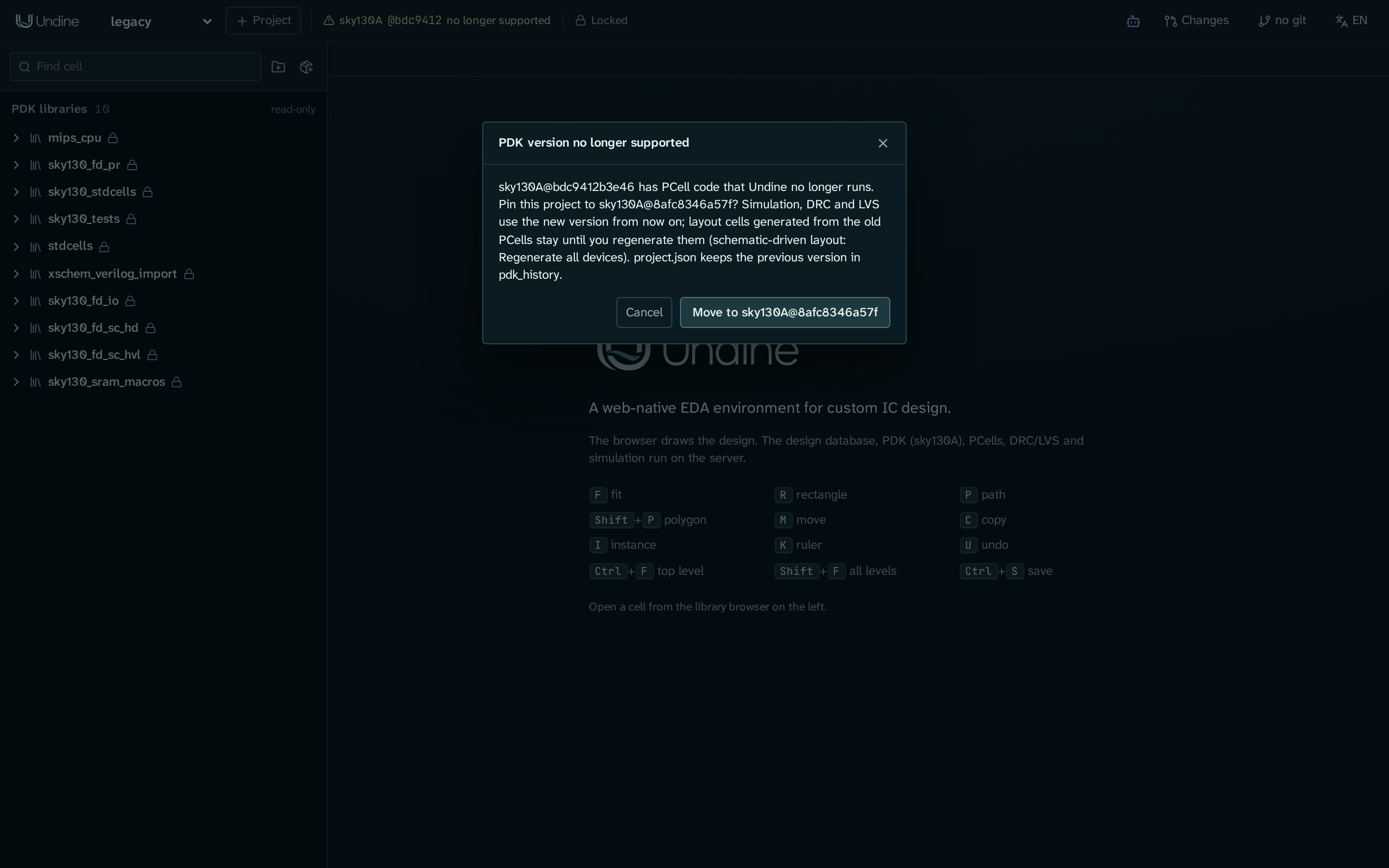
Click the badge. When a version of the same PDK whose PCells Undine runs is installed (the tested one first), the
dialog PDK version no longer supported offers Move to that version; it does what set-pdk does. When none is
installed, the dialog names the supported version and the set-pdk command: run ./setup.sh pdk, choose Rescan PDKs
in the badge's menu, and click the badge again.
pixi run doctor lists such PDKs too, with a set-pdk command for the projects pinned to them. The PDK that command
names is the first one found whose PCells Undine runs, which may be of another family (with GF180MCU installed, it is
gf180mcuA@...). Take the target from the badge's dialog instead, or use the same variant at the tested version,
such as sky130A@8afc8346a57f.
IHP SG13G2 Verilog-A models
IHP's transistor models (PSP103 and others) are Verilog-A. ngspice loads them compiled, as OSDI files, which needs two things:
- ngspice built with OSDI. The
ngspicestep of./setup.shbuilds ngspice 47 with OSDI into the pixi environment (conda-forge's ngspice has none). -
The compiled models. Compile them once after installing the PDK:
./setup.sh osdi # or: pixi run osdi
The osdi step downloads OpenVAF 23.5.0 into .pixi/build and runs the PDK's own compile script on a copy of its
Verilog-A sources, so the PDK stays as installed. The OSDI files go to Undine's
store, ~/.undine/store/build/<commit>/<variant>/osdi/ ($UNDINE_STORE moves it;
a PDK with no version uses build/local-<hash of its directory>/<variant>/osdi/), shared by every project.
- Undine loads them in every IHP simulation, from the store first, then from the PDK
(
libs.tech/ngspice/osdi/, where an older setup compiled them), then from the cache an earlier Undine compiled them into (~/.cache/undine/osdi/<PDK id>/). - Moving from the old cache. Models in the old cache are still used, and
pixi run doctornotes them (... from the old cache: run pixi run osdi to move them into the store).pixi run osdimoves them into the store without compiling them again (ihp-sg13g2: moved psp103.osdi from ... into ...) and removes the old directory once it is empty;pixi run osdi -nsays what it would move. - Until they are compiled, an IHP simulation stops and tells you to run
./setup.sh osdi. - The step skips a PDK whose models are there.
FORCE=1 pixi run osdicompiles them again;pixi run osdi -nonly says what it would do.
The step is not part of a plain ./setup.sh. It compiles the models of every PDK that needs them (SG13G2 and
SG13CMOS5L) in $PDK_ROOT, ~/.ciel and ~/.volare; for a PDK under another root, see
--pdk-root and the setup steps.
Checking your PDKs
./setup.sh check (or pixi run doctor) reports what Undine found, and the command that fixes what is missing. For
example, with SKY130, GF180MCU and the ihp-sg13 family installed at the tested versions, the IHP models not compiled
yet, and an old SKY130 left in ~/.volare, the lines about PDKs read (shortened):
 ✓ a PDK                                                        ok  gf180mcuA@792ef67037d7, ..., ihp-sg13cmos5l@89d42ee6d2fd, ihp-sg13g2@89d42ee6d2fd, sky130A@8afc8346a57f, ...
 ✓ ngspice with OSDI (IHP's Verilog-A models)                   ok  ngspice-47 : Circuit level simulation program
 - compiled Verilog-A models of the PDKs that need them         missing  [recommended]  -> pixi run osdi (OpenVAF; missing for ihp-sg13cmos5l@89d42ee6d2fd, ihp-sg13g2@89d42ee6d2fd)
 ✓ PCell environment (gdsfactory 8 with kfactory; sky130, IHP)  ok  .../.pixi/envs/pcell/bin/python
 ✓ GF180MCU PCell environment (gdsfactory 7.9)                  ok  .../.pixi/envs/pcell-gf180/bin/python
 ✓ a PDK whose PCells Undine runs                               ok  gf180mcuA@792ef67037d7, ..., ihp-sg13g2@89d42ee6d2fd, sky130A@8afc8346a57f, sky130B@8afc8346a57f
 ! PDKs no longer supported (PCell code before 2025)            sky130A@bdc9412b3e46, sky130B@bdc9412b3e46  [note]  -> projects pinned to them: python -m undine set-pdk PROJECT gf180mcuA@792ef67037d7
 ✓ ciel (PDK manager)                                           ok  .../.pixi/envs/default/bin/ciel
a PDK is required: without one, doctor exits with code 1. The GF180MCU PCell environment line and the compiled-models
line appear only when such a PDK is installed. The set-pdk target on the no longer supported line is not the one
to use for a SKY130 project; see Versions no longer supported.
doctor also shows each tool's version number and where it came from (0.30.12 (pixi)), Undine's version, and the
hash of its pixi.lock.
For one project, lib status compares the PDK (and the tools and dependencies) with undine.lock:
pixi run python -m undine lib status demo
  PDK                  pdk        other version  sky130A@bdc9412b3e46
  mylib                own        ok             libs/mylib
! PDK: locked sky130A@bdc9412b3e46, here sky130A@8afc8346a57f
  note: origins, Undine version and pixi.lock are not recorded (format 1)
In the window, the lock badge next to the PDK badge says Locked or N lock issues; click it for the same list.
When the difference is intended (you moved the PDK by hand, or on purpose use another version on this machine),
record what is in use with lib lock or the lock dialog's lock action (with a format 1 lock; a format 2 pin
moves with set-pdk or pdk verify --pin). See undine.lock and
PDK states.
PDK profiles
Each PDK family has a profile: what Undine needs to know about the process beyond the PDK's files. A profile names the layers and the metal stack, the DRC and LVS decks and their options, the Magic and Netgen setup files, the model library and its corners, the compiled models a simulation loads, the PCell library and the environment that runs it, the standard cells, and what does not work yet. Undine picks the profile by the PDK's name, then by its family.
Undine has profiles for SKY130, GF180MCU, IHP SG13G2 and IHP SG13CMOS5L. The first three have been run against the tested PDK versions; SG13CMOS5L's has not. A PDK of a family without a profile gets the generic one, Unknown process, which knows none of this: such a PDK is listed and a project can be pinned to it, but DRC, LVS, simulation models and PCells are unavailable.
A profile is data: a profile.toml in a profile package, one per ciel family (profile_sky130,
profile_gf180mcu, and profile_ihp_sg13 with both IHP processes). Each also lists the PDK versions Undine is tested
with: ./setup.sh pdk, pixi run pdk and pdk enable install the first of them, and a project created with a bare
PDK name (sky130A) gets that version when it is installed. To print it:
pixi run python -m undine pdk tested gf180mcu # 792ef67037d74c8c51811eab3ce23cf793491296
Undine reads only what it knows in a profile: an unknown key, a computed value other than the formulas and stack
generators Undine has, or a path outside the PDK is refused. For now the profile packages are built into Undine
(server/undine/data/profiles/), so a new profile comes with a new version of Undine. Whether Undine's tests have run
a profile (the verified flag of the profile, not a PDK state) is Undine's own record, not the profile's.
Architecture and development shows where the profiles sit in the server.
Planned
A package system for libraries and PDKs, with profiles published as packages in the index (and with them the hashes that make a PDK verified), is designed in Packages and PDKs; Phases says what exists today. Pinning a PDK by its files and fetching it through ciel are there now.
See also
- Install:
./setup.shand its steps - Libraries and dependencies:
undine.lock,lib status,lib lock - Command line and configuration:
new,set-pdk,pdk list,pdk verify,pdk fetch,doctor,PDK_ROOT,UNDINE_STORE - Tapeout: the shuttle targets per PDK